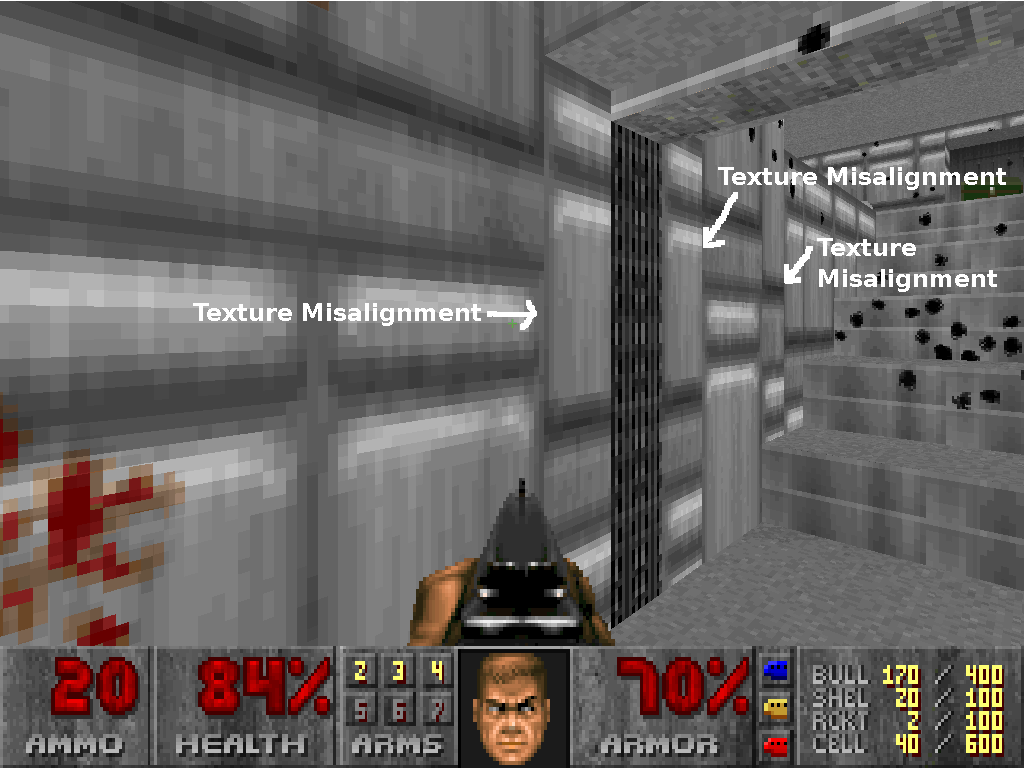

Example of misaligned wall textures
Texture alignment in Doom is perhaps more complicated than in modern true-3D games. A number of factors affect how a texture is aligned.
Wall textures
Ordinarily, most textures consist of a number of repeating shapes to create a pattern. Bricks for example almost always consist of a pattern of similarly shaped rectangles. The objective of aligning a texture appropriately is attempting to position the texture on the wall so that as many of the intended shapes included in the texture are displayed without being cutoff by a vertex in your wall. In the screenshot in the right, the rounded shapes in the texture are cut off by the differing height levels of the adjacent sectors that are decorated with the same wall texture. In many cases the texture can be aligned to repeat the texture so that none of the intended shapes are being cut off. Sometimes this can be very difficult to do, and can often be fixed by using a different texture designed to fit that particular length and height of the wall you are applying a texture to. In some cases, textures with no particular cracks (or too many to draw attentiont to) or bevels displayed in the image can be used in just about all lengths and heights of a wall, but using it excessively can make a map look very dull. The most rewarding part of mapping these days is how effectively a mapper can align the textures in a map.
Alignment of wall textures is a fairly complex subject. The way textures are aligned depends on the type of line (single or two sided line), the linedef flags controlling pegging, and the sidedef offsets.
- If a linedef is one sided (a solid wall), the top of the texture is at the ceiling, and continues downward to the floor.
- If the "lower unpegged" flag is set on the linedef, the bottom of the texture is placed at the floor, and is drawn upwards from here. This is commonly used in the jambs in doors; because Doom's engine treats each door as a "rising ceiling", a doorjamb pegged to the top of the wall would "rise up" with the door.
- If a linedef is two sided, acting as a "bridge" between two sectors - such as a window or a step - the bottom of the upper texture will be at the lowest ceiling and drawn upwards, and the top of the lower texture will be at the highest floor and drawn downwards.
- If the "upper unpegged" flag is set on the linedef, the top of the upper texture will be at the highest ceiling and will be drawn downward.
- If the "lower unpegged" flag is set on the linedef, the lower texture will be aligned like a pegged single-sided linedef, with the top of the texture aligned with the ceiling, although only the part that is between the higher and the lower floor is actually drawn. This allows the texture to align with neighbouring single-sided linedefs.
- If a middle texture is set, it is clipped by the highest floor and the lowest ceiling and follows the same alignment logic as for a single sided linedef, but does not repeat vertically.
The alignment of textures can be adjusted with the sidedef X and Y alignment control. This is applied after the logic controlling pegging and affects all textures.
Level designers must ensure that textures tile in a consistent and aesthetically pleasing manner, such that the player is unaware that walls, floors and so forth are actually made of repeating textures rather than a single, continuous texture.
Floor and ceiling textures
All floor and ceiling textures are aligned on a 64-unit grid. Because of this, in some cases the only way to align a floor texture is to move the position of the sector which defines the floor itself.
Some ports such as Boom add the ability to change the alignment of floor and ceiling textures, even allowing effects such as moving conveyor belts. These are typically implemented using a separate linedef tagged to the sector.